Castmagic Review 2026 — The Best AI Tool for Podcast Content?
If you’ve ever finished recording an episode and thought “now I have to write all the content that goes with this” — Castmagic was built specifically for that problem.
I’ve been using Castmagic with my own shows and recommending it to clients for long enough to give you a straight answer on whether it’s worth it. The short version: it’s the AI tool I trust more than any other in my podcasting workflow. Here’s why.
What Is Castmagic?
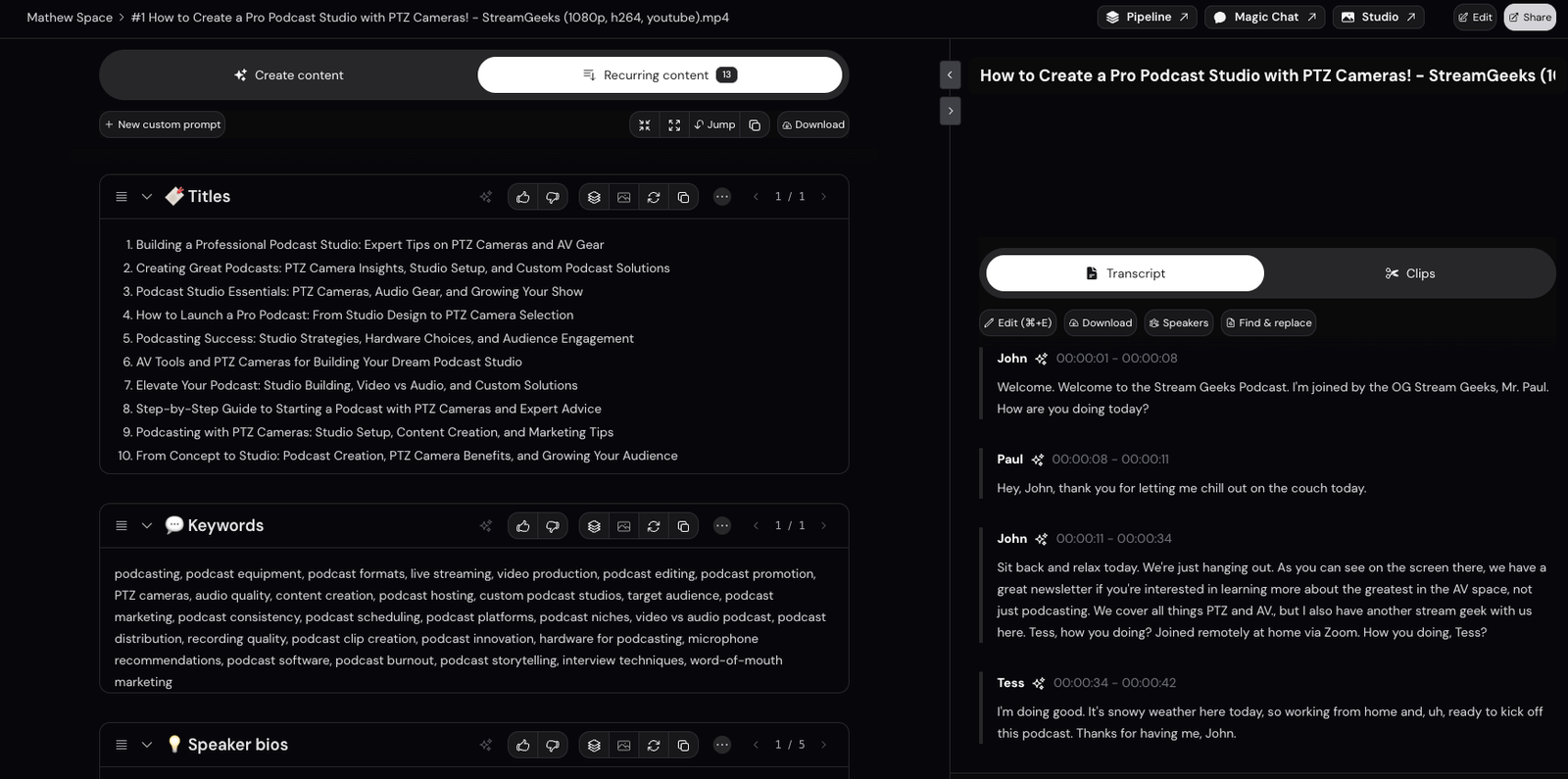
Castmagic is an AI-powered content platform that takes your audio or video recordings and turns them into written content — automatically. Upload an episode, and Castmagic produces show notes, summaries, newsletters, social posts, timestamped chapters, quote pulls, and more.
But calling it a transcription tool undersells it significantly. The real value is what it does with the transcript after it’s generated.
What Castmagic Just Shipped — March 2026
Before I get into the full review, it’s worth noting that Castmagic just released three significant upgrades that make it considerably more powerful than it was even a few months ago.
Global Search (⌘K) — You can now search across your entire Castmagic workspace in one place — recordings, transcripts, AI-generated content, Magic Chat conversations, speakers, and spaces. If you’re sitting on a library of episodes, this is a game-changer for finding specific moments, quotes, or topics across your entire archive.
AI Prompt Builder and Prompt Management — Castmagic has completely rebuilt how you create and manage prompts. You can now build custom AI prompts with a guided builder, see prompt responses across your entire space in one view, and export all prompt responses as a CSV. More on why this matters below.
Speaker Profiles — Click into any speaker in your library and Castmagic automatically builds a rich profile — AI-generated summary, topic expertise, episode history, notable quotes, clips, and conversation highlights. For anyone running an interview show, this is genuinely useful for both research and repurposing.
These aren’t minor updates. They push Castmagic from a solid transcription-plus tool into something closer to a full content intelligence platform.
Key Features
Custom Prompts Make Everything Repeatable
This is the feature I talk about most when I recommend Castmagic to clients, and the new Prompt Builder takes it even further. The ability to set up custom prompts for your specific show means the process of generating content assets becomes completely repeatable.
You set up your prompts once — your show notes format, your newsletter structure, your social post style — and every episode runs through the same system. The output is consistent, on-brand, and fast. What used to take hours of writing after every episode now takes minutes of reviewing and editing.
For podcast production companies or anyone managing multiple shows, this alone justifies the subscription.
No Limit on Content Types
Most AI tools do one or two things well. Castmagic does everything. Show notes, episode summaries, chapter markers, LinkedIn posts, Twitter threads, email newsletters, blog posts, pull quotes, guest bios — there’s no ceiling on what you can generate from a single recording.
The practical implication: one episode recording becomes a week’s worth of content across every platform you’re active on. That’s the kind of leverage that changes how you think about your content calendar.
Multiple Spaces for Multiple Shows
If you’re running more than one podcast — or producing shows for clients — Castmagic’s multiple spaces feature is essential. Each space keeps its own recordings, prompts, transcripts, and generated content completely separate.
This is the difference between a tool built for hobbyists and a tool built for professionals. Castmagic clearly understands that serious podcasters aren’t running just one show.
Magic Chat
Beyond the automated outputs, Castmagic includes a conversational AI interface where you can query your own content directly. Ask it to pull every moment a guest mentioned a specific topic, find the best soundbites from an episode, or generate something completely custom. It’s a genuinely useful layer on top of the automated workflow.
Transcription Quality
The transcription accuracy is excellent — speaker identification, timestamps, and handling of industry-specific vocabulary all hold up well. It’s not perfect on heavy accents or very noisy recordings, but in a controlled recording environment it’s as good as anything else on the market.
Castmagic Pricing
Castmagic pricing is based on usage and plan tier. Plans start with a free trial so you can test the full workflow before committing.
Always verify current pricing at Castmagic’s pricing page as plans are updated regularly.
Pros and Cons
Pros
- Custom prompts make content creation fully repeatable
- No limit on content types — show notes to newsletters to social posts
- Multiple spaces for managing multiple shows or clients
- New Global Search makes your entire archive searchable
- New Speaker Profiles add serious value for interview shows
- AI Prompt Builder makes custom prompt creation accessible
- Saves hours of writing time per episode
- 30-day free trial available
Cons
- Takes time upfront to set up custom prompts properly
- Output still requires editing — it’s a starting point, not a finished product
- Can feel like overkill if you’re only running one show with infrequent publishing
- Pricing scales with usage — heavy users need to watch their limits
Who Should Use Castmagic
- Interview-based podcasters — the transcription, speaker identification, and content generation workflow is built for this format
- Podcasters publishing regularly — the time savings compound fast if you’re releasing weekly or more
- Anyone running multiple shows — multiple spaces keep everything clean and separate
- Podcast production companies or agencies — repeatable custom prompts across client shows is exactly what this tool was built for
- Content-focused podcasters — if you want to turn each episode into blog posts, newsletters, and social content, nothing does it more efficiently
Who Should Look Elsewhere
- Hobbyist podcasters publishing rarely — the ROI on the subscription doesn’t add up if you’re only releasing a few episodes a year
- Shows primarily focused on video — Castmagic handles video but the workflow is most optimized for audio-first production
- Anyone who wants fully finished, zero-edit content — AI-generated content needs a human pass before it goes out
My Honest Verdict
Castmagic is the AI tool I trust most in my podcast workflow — and the three major updates they just shipped in March 2026 push it further ahead of the competition. The combination of custom repeatable prompts, unlimited content types, multiple spaces, and now a fully searchable archive with speaker profiles is hard to match.
If you’re spending hours every week turning episode recordings into written content, Castmagic pays for itself quickly. I’ve recommended it to more clients than I can count and I’ve never had one come back disappointed.
The free trial removes all the risk. Try it on one episode and you’ll understand immediately why this is my top AI tool recommendation.
Start your free Castmagic trial here →
Frequently Asked Questions
Does Castmagic work for video podcasts? Yes — Castmagic processes both audio and video files. The content generation workflow works the same way regardless of format.
How accurate is Castmagic’s transcription? Very accurate in controlled recording environments. Speaker identification and timestamps are reliable. Heavy accents or background noise can affect quality like any transcription tool.
Can I use Castmagic for multiple podcasts? Yes — multiple spaces let you keep separate shows, prompts, and content libraries completely isolated from each other.
How long does it take to process an episode? Processing time depends on episode length but most episodes are ready within a few minutes of upload.
Does Castmagic integrate with podcast hosting platforms? Castmagic works as a standalone platform. You export content and use it wherever you need it — your hosting platform, email tool, or social scheduler.
Disclosure: This page contains affiliate links. If you sign up for Castmagic through my link I earn a commission at no extra cost to you. I only recommend tools I’ve used personally and with clients.